System — disk locations and administrator warnings
The System page of Preferences holds the settings that describe
the computer 4d runs on, as opposed to the microscope or a
particular project: where the scratch disks are, and how the automatic
system warning e-mails to the administrator behave. These
settings live in the user-level configuration file 4d.cfg and apply
to every project you open. The page is divided into four sections, described
below in the order in which they appear.
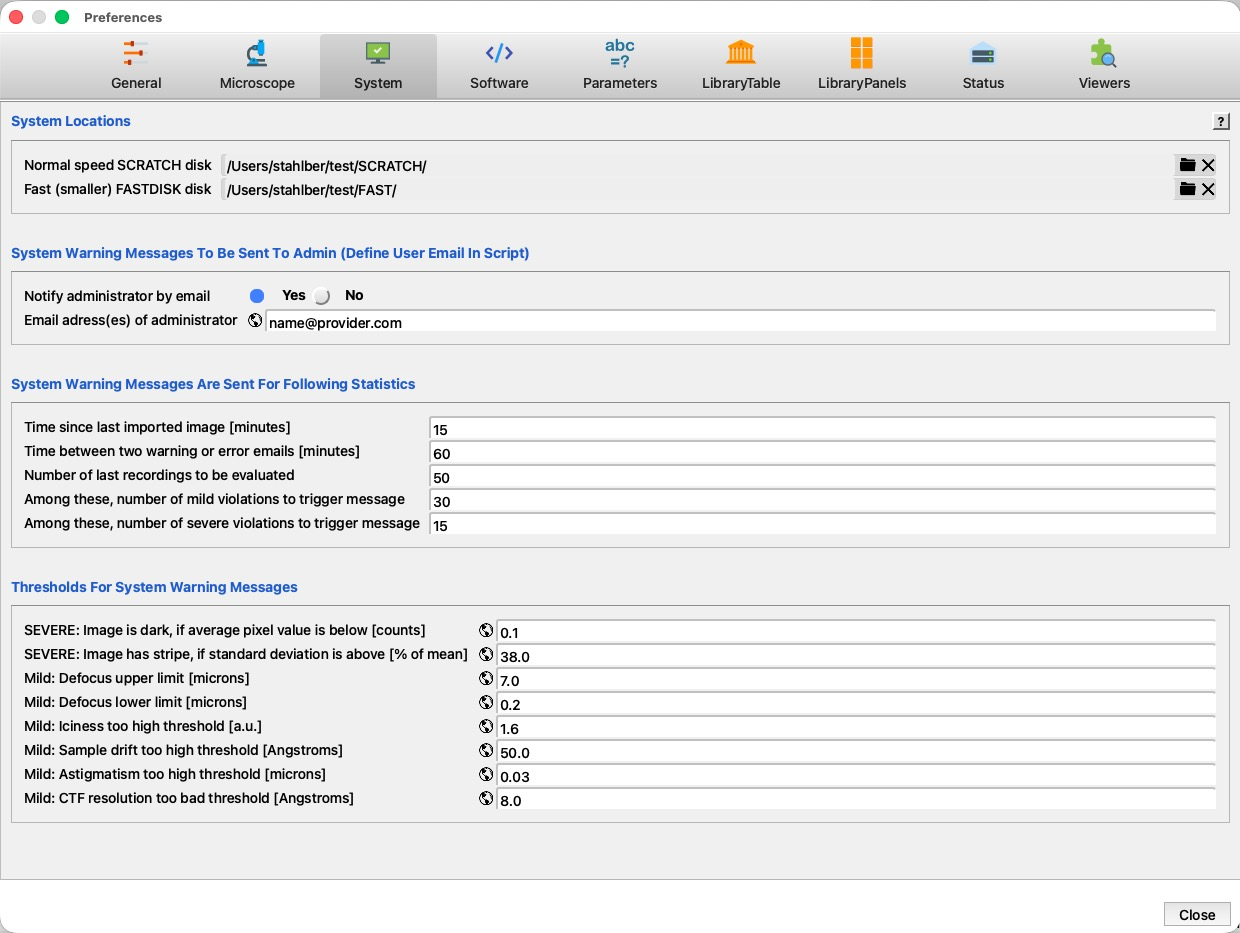
The numbered markers on the screenshot point to each region; the legend explains them, and the tables below list every parameter. The ? button at the right end of the System Locations title line opens this page.
 1
2
3
4
5
6
1
2
3
4
5
6
| # | Region | What it is and does |
|---|---|---|
| 1 | Preferences tabs | The nine Preferences pages; System is selected here. |
| 2 | System Locations | The two scratch disks 4d’s processing scripts may use. The ? help button sits at the right end of this title line. See System Locations. |
| 3 | Warning messages to Admin | Whether the administrator is notified by e-mail, and at which address(es). See Administrator notification. |
| 4 | Statistics that trigger a message | How many recent recordings are evaluated, and how many violations are needed before a message is sent. See When a warning is sent. |
| 5 | Thresholds | The image-quality limits that mark a recording as a mild or severe violation. See Thresholds. |
| 6 | Close | Close the Preferences dialog. |
System Locations
Some processing scripts write large intermediate files. Instead of filling the
project directory, they can be pointed to dedicated scratch areas on faster
disks. Two such areas are configured here: SCRATCH, a large
and fast disk such as an NVMe SSD, and FASTDISK, an even
faster but typically smaller disk such as a RAM disk. Use a single dot
(.) to disable a scratch disk — the scripts then work in the
project directory instead.
| Parameter | Label | Meaning | Default |
|---|---|---|---|
SCRATCH_DISK | Faster speed SCRATCH disk | Absolute path of a fast scratch disk, for example an NVMe SSD used to speed up the reading and writing of temporary files (e.g. /mnt/scratch). | . |
FAST_DISK | Fast (smaller) FASTDISK disk | Absolute path of a super fast but typically smaller scratch disk, such as a RAM disk (e.g. /mnt/RAM_disk). | . |
Administrator notification
During automatic data collection, 4d evaluates the most recent recordings and can send an e-mail to the administrator when the data quality drops or when no new images arrive any more. The address used as the sender is defined in the notification script itself; the recipients are set here.
| Parameter | Label | Meaning | Default |
|---|---|---|---|
notify_email_admin | Notify administrator by email | Master switch (y/n). When off, no warning e-mails are sent at all. | y |
notify_email_admin_adress | Email address(es) of administrator | Full e-mail address of the administrator. Separate several addresses with commas. This value is synchronized to the project level. | name@provider.com |
When a warning is sent
A message is not sent for every single bad image. 4d looks at the last N recordings and counts how many of them violate the thresholds below. Only when enough of them do is a message sent, and a minimum interval between two messages avoids flooding the administrator’s mailbox.
| Parameter | Label | Meaning | Default |
|---|---|---|---|
notify_last_minutes | Time since last imported image [minutes] | If no new image has been imported for this many minutes, a warning is sent (data collection may have stalled). | 15 |
notify_delay_minutes | Time between two warning or error emails [minutes] | Minimum interval between two consecutive e-mails. | 60 |
notify_lastnumber | Number of last recordings to be evaluated | How many of the most recent recordings are examined (N). | 50 |
notify_limit_mild | Among these, number of mild violations to trigger message | A message is sent when at least this many of the N recordings show a mild violation. | 30 |
notify_limit_severe | Among these, number of severe violations to trigger message | A message is sent when at least this many of the N recordings show a severe violation. | 15 |
Thresholds
Each threshold classifies a recording as either a SEVERE or a Mild violation, as indicated by the prefix of its label. Severe violations (dark images, images with a black stripe) usually mean that something is wrong with the microscope or the detector; mild violations (defocus, ice, drift, astigmatism, CTF resolution) indicate poor but still usable data. All threshold values are synchronized to the project level, so a project can override them.
| Parameter | Label | A recording violates when… | Default |
|---|---|---|---|
flag_isdark_threshold | SEVERE: Image is dark, if average pixel value is below [counts] | …its mean pixel value is below this value. | 0.1 |
flag_hasstripe_threshold | SEVERE: Image has stripe, if standard deviation is above [% of mean] | …its standard deviation, as a percentage of the mean, is above this value (a black stripe or region). | 38.0 |
flag_hastoohighdefocus_threshold | Mild: Defocus upper limit [microns] | …its defocus is above this value. | 7.0 |
flag_hastoolowdefocus_threshold | Mild: Defocus lower limit [microns] | …its defocus is below this value. | 0.2 |
flag_icinesstoohigh_threshold | Mild: Iciness too high threshold [a.u.] | …its iciness value is above this value. | 1.6 |
flag_drifttoohigh_threshold | Mild: Sample drift too high threshold [Angstroms] | …its measured drift is above this value. | 50.0 |
flag_astigmatismtoohigh_threshold | Mild: Astigmatism too high threshold [microns] | …its astigmatism is above this value. | 0.03 |
flag_ctfresolutiontoobad_threshold | Mild: CTF resolution too bad threshold [Angstroms] | …the resolution of its CTF fit is worse (a larger number) than this value. | 8.0 |