
Define the order of parameters for the Library table
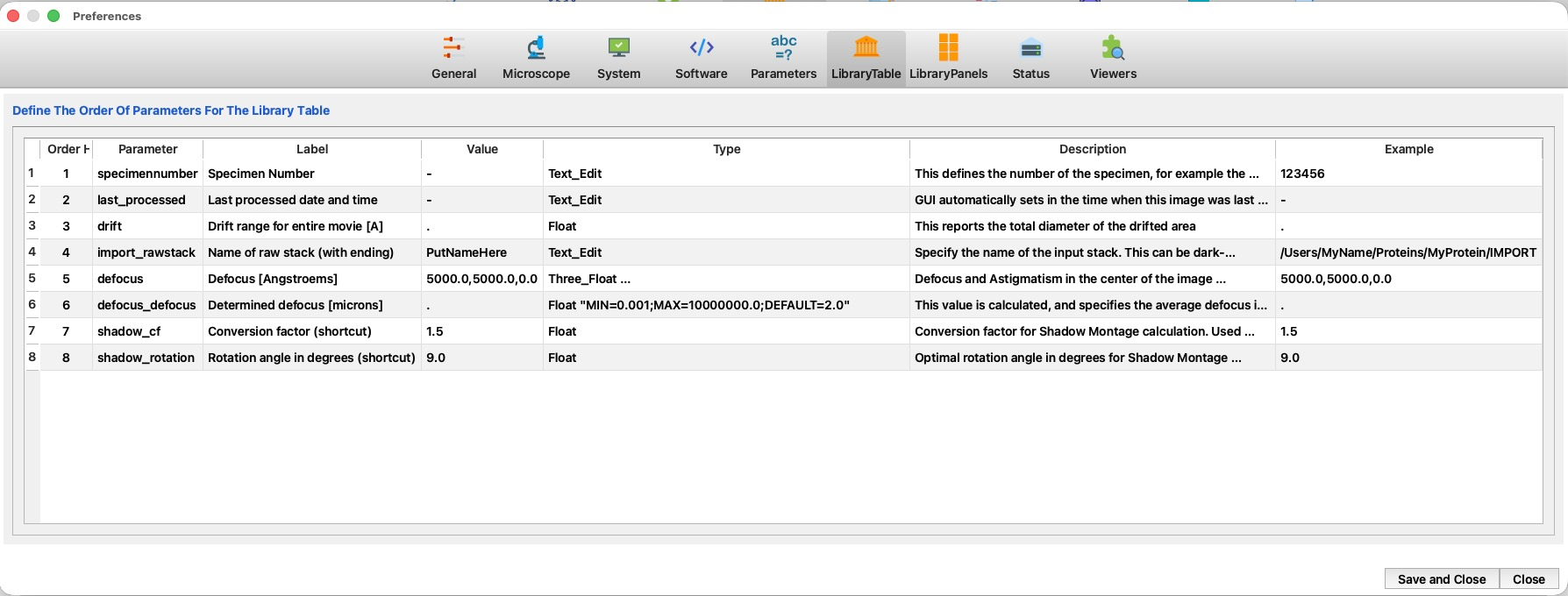
The LibraryTable page of Preferences controls which parameters appear as columns in the Library table and in what order. Every parameter that is ticked for the Library table (its 4D / Fibr. "show in table" box in the Parameter Editor) is listed here; this page lets you arrange the order in which those columns are shown.
The numbered markers on the screenshot point to each region; the legend explains them. The ? button at the right end of the title line opens this page.
 1
2
3
4
5
6
7
8
9
10
11
1
2
3
4
5
6
7
8
9
10
11
| # | Region / column | What it is and does |
|---|---|---|
| 1 | Preferences tabs | The nine Preferences pages; LibraryTable is selected here. |
| 2 | Title | "Define the order of parameters for the Library table." The ? help button sits at the right end of this line. |
| 3 | Row number | The current position of the parameter in the list. |
| 4 | Edit Order Here | The editable order number. Change it to move a parameter — a lower number places its column further left in the Library table. (You can also drag rows to reorder.) |
| 5 | Parameter | The parameter's internal name. |
| 6 | Label | The text used as the column header in the Library table. |
| 7 | Value | The parameter's default value (shown for reference). |
| 8 | Type | The parameter's type (reference) — see the parameter types. |
| 9 | Description | The parameter's description (reference). |
| 10 | Example | An example value (reference). |
| 11 | Save and Close / Close | Save and Close writes the new order; Close discards it. |
How it works
- Which parameters appear here is decided in the Parameter Editor: tick a parameter's show-in-table box (the 4D column for 4D-STEM mode, or Fibr. for Fibril mode) to add it to this list.
- To reorder the Library columns, edit the number in Edit Order Here (or drag the rows), then press Save and Close. The Parameter, Label, Value, Type, Description and Example columns are read-only here — they are shown so you can recognise each parameter.
- The Library table refreshes to the new column order when you save.